Wavetable Granular Spectral v0.2.3
Stratus
Your flagship VST. Free.
Three oscillators that each run as a wavetable, a grain cloud or a spectral resynthesis. Drag-and-drop modulation, an eight-module FX rack and 101 presets, drawn in black ink on white paper.
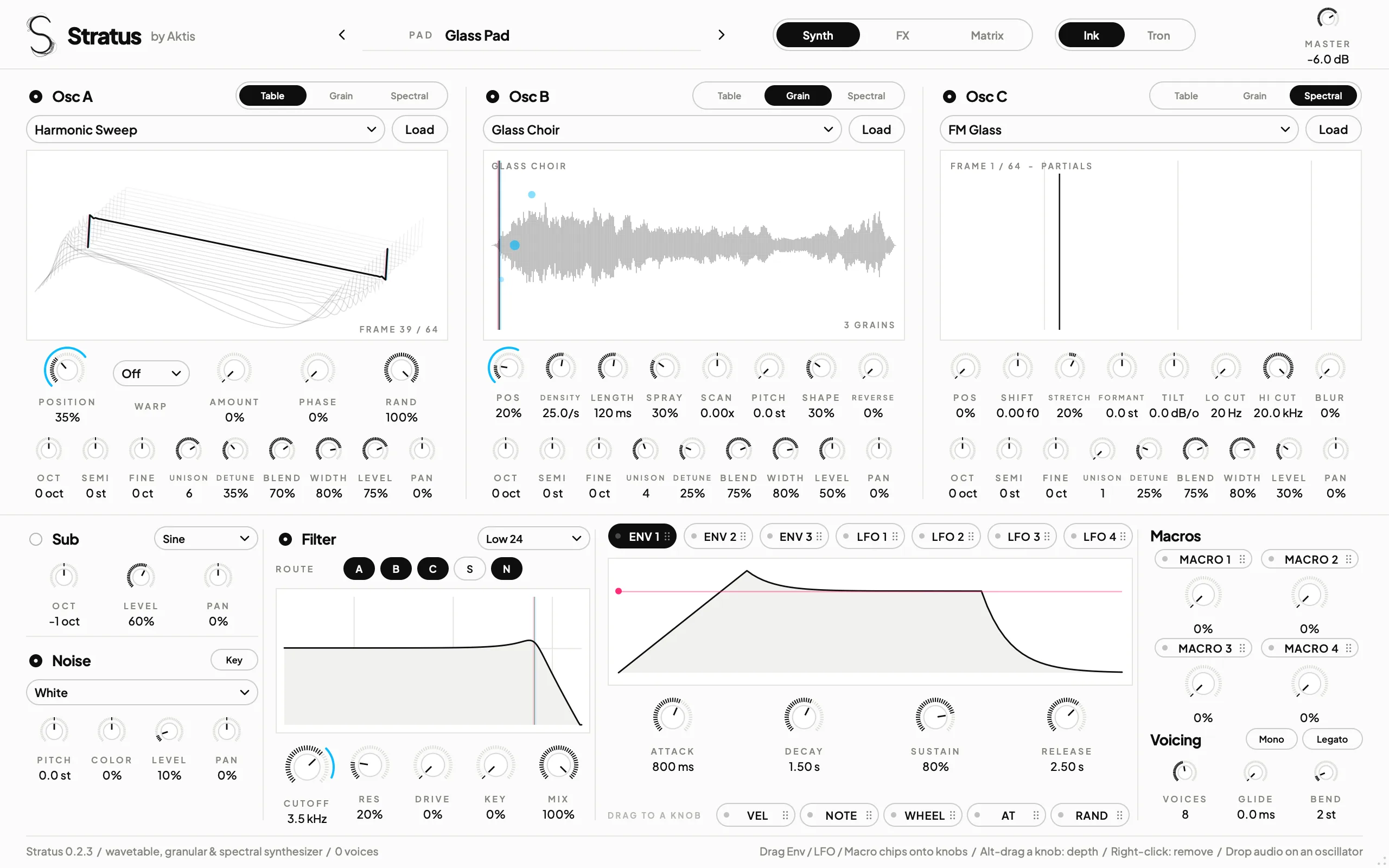
The real interface. Two skins, Ink and Tron: switch from the header and every open Stratus window follows.
01 Oscillators
Three oscillators, three ways to make sound.
Osc A, B and C each run in one of three modes. Table sweeps a wavetable through up to 256 frames. Grain throws a cloud of up to 24 grains per voice from a sound source. Spectral rebuilds the table as free partials you can shift, stretch and blur.
- Unison 1 to 8 on every oscillator, with detune, blend and stereo width
- Table warps: Sync, Bend, PWM, Mirror and FM from another oscillator
- Grain: density, length, spray, scan, random pitch, window shape and reverse. Drop in any audio file
- Spectral: shift, stretch into bells, formant, tilt, cuts and blur, with no aliasing at any pitch
12 wavetables and 16 grain sources, all generated from maths. Pick one, or drag across the display to scrub.
Sub
Sine, triangle, saw or square, band-limited with PolyBLEP, with its own octave, level and pan.
Noise
20 stereo loops, from vinyl and tape hiss to rain, Geiger and crowd murmur, with pitch, keytracking and colour.
Presets
101: Init plus ten each of bass, lead, pad, pluck, keys, bell, atmosphere, texture, FX and sequence.
Voicing
1 to 16 voices, mono and legato, glide, pitch-bend range and sustain pedal.
02 Filter
One filter, six shapes.
Low and high pass at 12 or 24 dB, band and notch. Add drive, keytracking and a dry/wet mix, and choose which sources pass through it: Osc A, B and C, the sub and the noise.
- State-variable design that stays stable under fast modulation
- Cutoff, resonance, drive and mix are all modulation destinations
03 Modulation
Drag it onto a knob.
Grab an envelope, LFO or macro chip and drop it on any knob. A cyan ring shows the range and a magenta dot shows the live value. Alt-drag the knob to change the depth, right-click it to remove the route.
- 3
- envelopes
- 4
- LFOs, 7 shapes, tempo sync
- 4
- macros
- 32
- routes to 59 destinations, grain, spectral and FX included
Velocity, note, mod wheel, aftertouch and per-note random are sources too. The Matrix page lists every route, and routes are saved with your project and presets.
Tip: tap a chip, then tap a knob. Works with the keyboard too.
04 FX rack
Eight effects, in any order.
Drag the modules into the order you want, switch them on and off, and every one draws what it's doing. Drive, feedback and the mix controls take modulation like any other knob, and a safety limiter sits at the end of the chain.
Limiter
05 Measured
Clean, light and tested.
Measured on the 0.2.2 build, which has the same sound engine as 0.2.3. The tests and pluginval run on every build.
- −68 to −78 dB
- non-harmonic energy on a wavetable saw or square at C6, C7 and C8
- −90 dB
- non-harmonic energy in Spectral mode, even at C8
- ~1%
- of one Apple Silicon core for a 4-note chord with the sub, noise, filter and FX
- Level 10
- pluginval strictness passed on the VST3: editor open and close while processing, state restore, automation, parameter fuzzing
- Worst case8 notes with all three oscillators at unison 8: Table 1.7%, Grain 8% and Spectral 4.3% of one core.
- Tested206 checks pass, also under Guard Malloc, plus 120 more for the FX and the generated sounds.
- Real-time safeThe audio thread never allocates or locks, and MIDI is sample-accurate.
Stratus 0.2.3 macOS Apple Silicon
Your flagship VST. Free.
VST3, AU and the standalone app, 101 presets, Ink and Tron skins. Leave your email and the download starts.
You're on the list. Your download is starting.
These links work in this browser for 24 hours. Install notes: INSTALL.txt
Requires an Apple Silicon Mac (M1 or newer) and macOS 11 or later.
How installing works
-
1
Open the installer. This build isn't signed with an Apple Developer ID yet, so macOS says it can't verify the developer. Click Done, then go to System Settings › Privacy & Security and click Open Anyway. On macOS 14 and older you can right-click the .pkg and choose Open.
-
2
Follow the installer. It installs
Stratus.vst3andStratus.componentin /Library/Audio/Plug-Ins, andStratus.appin Applications. -
3
Rescan your plug-ins. Stratus is an instrument: add it to a new instrument track or channel. In the standalone app, play notes with A to K and change octave with Z and X.